Showing posts with label Online. Show all posts

Wednesday, February 28, 2018

Drive Thru History Adventures

I am here to tell you, if you want to learn history the fun way, look no further than Drive Thru History, and their new brainchild, Drive Thru History Adventures.  We have had the opportunity to review this Dave Stotts gem for the past month or so with the Homeschool Review Crew and are loving every minute of it.

Drive Thru History Adventures

Let me start by saying we were already big fans of Drive Thru History and its founder, Dave Stotts.  We own several of the original history DVD sets, including the most recent the The Gospels which we reviewed last year.  Our family loves anything history and my boys especially are walking encyclopedias when it comes to dates and facts.  Add to that the fact that one is an auditory learner and the other loves anything on a screen, and well, let's just say we are Drive Thru History groupies.

Drive Thru History Adventures

So what's with this new Drive Thru History Adventures?

Well, I am so glad you asked!

Drive Thru History Adventures has taken the fun and yet informative Drive Thru History DVDs, made them available in an online subscription, and....wait for it...added curriculum.  While this curriculum is targeting high school students, it can easily be adapted for younger kids and family learning.

The curriculum for each 30 minute video segment includes readings of historical documents, worksheets that you can print off (don't worry, answer guides are provided), copies of artwork from that particular time period and more.

At this time, three time periods in history are available-

  • Bible History (18 weeks on the Gospels, with an additional 18 weeks being developed which will cover the book of Acts through Revelation)
  • American History (12 weeks on early American history)
  • Ancient History (12 weeks on early Greece, Rome, and Asia Minor)
Drive Thru History Adventures
You can choose your favorite and work your way through the course, or skip around, depending on your mood for the day.

Want to change it up a bit?  Each week Dave posts a "week in review" with all kinds of project updates, answers to questions, and new articles.  Like always, his humor will keep you and your children entertained.  There is a "behind the scenes" section that shows some great blooper clips, as well as a "Side Roads" section.  Here you will find smaller chunks of information about, well, anything on Dave's mind.  Our favorite so far has been the history of Ground Hog Day.  Colby, who is 10, rewinds and watches one section over and over again.

A "dig deeper" section further explains points mentioned in the main videos and is a great way to go into more detail for your older students.  Under the Suggested Readings tab you will find PDF files to original documents mentioned for further reading as well.  New content is added weekly, so you will not run out of things to watch and read for quite a while, I promise.


Also available in your subscription is a Drive Thru History Adventures App you can download that allows you to access the videos from your iPhone or iPad.  It is a perfect way to allow your kids to watch top quality history videos while in the car or sitting in a waiting room.  History on the go?  Yes, please!

You can also join a private Facebook group just for subscribers.  I admit I was slow in doing so, but am so glad I did.  As a member you get weekly updates, as well as extra pictures and convos from Dave himself.  Plus a fun welcome when you join!

So how have we used this and what do we think?
By now you probably realize we love it.  No surprise there.  Dave has a way of bringing history to life that just pulls you in.  Without watering down the facts he explains things in terms that kids seem to be able to take in.  The videography is amazing and you finish a video adventure feeling like you have been on a trip with him.  

One of the things my boys like best about Dave is his humor.  He is just plain funny!   In the middle of some pretty serious history lessons, his fun puns, jokes, and silliness break up the lesson a bit and keep you interested.


Since we recently watched The Gospels series, we decided to revisit the American History Adventures.  My oldest son, age 16, has watched them via our DVDs, but our youngest has not seen more than a few.  He has chosen to watch them without me, though I do have to limit him to about once a week or he becomes a bit obsessed and will watch them for hours.  Because he is currently studying American History with our current curriculum, this has been a perfect supplement to what he is already learning.  Again, the curriculum is geared to high schoolers so we have answered the questions orally.  A few he has struggled with, but most have been easy to talk about conversationally.  He doesn't love all of the documents (I do think they are better aimed at the older students) but he LOVES all of the pictures. 

Cool story about this picture featured on episode three, Beginnings of Revolution. Colby had just finished studying about the artist John Trumbull in his daily history lessons when we were excited to see one of his paintings featured in this lesson. Trumbull painted many paintings we still enjoy today, a huge feat for a man with one eye!  We are still working our way through the sessions, watching to see if there are any more familiar things mentioned.


Of course, Colby's favorite parts of Drive Thru History Adventures are the videos and DAVE!  He laughs out loud, insists on watching parts again and again, and shares stories with the family at dinner time.  Oh the stories!

What's not to love about a history program that does that and more?!  While we have yet to use this with our teen, he is looking forward to free time in the summer that he can use to re-watch his old favorites!  Just don't tell him he has questions to answer, too! ;)


DEALS and MORE DEALS-
Currently, Drive Thru History Adventures is running a special that includes a free DVD The Gospels set with your subscription. Drive Thru History Adventures is offering 20% for readers of The Old Schoolhouse® Magazine. Check out page 19 of the winter edition for details!
 
Drive Thru History Adventures - Subscription {Drive Thru History Adventures Reviews}
 
 
Crew Disclaimer


Tuesday, July 28, 2015

Unlock Math

Math is not one of my favorite things.  It is also not my favorite subject to teach.  But as a homeschooling mom, it is my duty to teach it.  Unless I can find someone else to. Guess what?  I found someone for this year!  Yay me!  Introducing UnLock Pre- Algebra  grades 7/8th) from UnLock Math.  This complete online homeschool math curriculum taught by Alesia Blackwood is my new favorite!  As former math teacher and fellow homeschooler., Alesia has taken her wealth of knowledge in math and teaching and made my life a lot easier!
We were blessed by UnLock Math to have a year of access to this amazing product and will continue to use it for my 8th grader for the school year.  A quick log in to their site automatically brings up a personalized dashboard that shows each lesson, how much progress you have made, and a place to view and print a personalized progress report and grade-book.  There is also a downloadable pacing guide you can print out and use for scheduling purposes if you like.  Each lesson takes approximately 30 minutes and the course is set up to be completed in 9 months, give or take depending on your student.
                                     
There are 16 Units in the Pre-Algebra course.  By hitting the launch button next to the unit names on the dashboard page, you are taken to the lesson page.  There you can choose the lesson you are on and begin by doing a short warm-up session that includes 5 problems.  From there you watch the video that teaches that day's lesson.  These quick "bite sized" chunks of teaching videos are all taught by Alesia and about 4-10 minutes apiece.

 Following the lesson video you have practice problems to do followed by a tab (review) and then a challenge yourself problem that stretches your child's thinking and problem solving skills.  This challenge problem does not count against you but basically serves as bonus points.  You can do a lesson twice and keep the higher score.  Another unique feature is the fact that you are able to look at fully explained answers for each problem your child does. There is also online help at any time if you just get stuck and need some help! Just a quick email and Alesia will respond back promptly.  Ask me how I know!

At the very end of each lesson is a page of reference notes your child can print out to use for any further review they need or to just keep a notebook of what they have learned so far.  Sprinkled throughout the program are quizzes, a mid-semester test and a final.  Automatic grading for each of those and the daily lessons are recorded in the gradebook that can be seen by your child or accessed by you from a teachers page, in which you can keep track of multiple students at one time.   After each lesson is completed it will show it on the dashboard, but you can repeat any lesson at any time.

Units include-

Whole Numbers
Integers
Variables and Expressions
Rational Numbers
Fractions
Equations
Inequalities
The Coordinate Plane
Mid Term Review and Test
Decimals
Percent
Polynomials
Triangles
2 D geometry
# D Geometry
Analyzing Data
Probability and Stats
Final Review and Test

How did we use UnLock Math?
We have a math program we have used for a while now, but I decided to put it aside and give this a try with my upcoming 8th grader.  He is an auditory learner so I felt like this would be a good fit for him.  We had already previewed a lesson by Alesia and he said he liked her easy going teaching style. Salem did one lesson a day on average.

What Did We Think?
We love it!  Well, I love it and Salem likes it.  Trust me, that is saying a lot for a 8th grade boy.  There is just nothing bad to say about this program.  The site is easy to navigate and Alesia makes the lessons student-friendly and even humorous at times.  The lessons are quite complete and yet are short enough to hold a student's attention and not bore them to death.  We like that you can actually see Alesia, not just hear her and that she writes on a white board each step of the way.


The automatic grading is a huge MUST for me.  At this level of math, it is just so much easier for a computer to take on that work.

Let me say a quick thing about the customer service.  As I mentioned before, I emailed UnLock Math about a concept that we could just not get in our heads.  It was a matter of wording, but it kept tripping us up.  Immediately Matthew emailed us back with a complete explanation.  When we still did not get it (I told you I am not a math person) Alesia joined the email chain and got us straightened out.  The company also had a few glitches in the system that they had to work through during our review times and throughout that time Matthew was in contact with us to make sure we were up to date with what was happening and what we needed to do to our end to clear things us.  It is customer service like that that I believe is worth its weight in gold when it come to a homeschooling curriculum!

Because of our success with this program, Salem is dropping his old math by choice and continuing on with UnLock Math Pre-Algebra.  It is a change in our curriculum for this year that we are BOTH very excited about!

Also available Algebra (grades 8/9), and coming soon Algebra 2 (10/11th)

UnLock Math Review

Crew Disclaimer

Monday, November 10, 2014

IXL- TOS Review

Days are busy.  Life is full.  And sometimes getting all of the school subjects in for the day is a challenge.  For us, that is when computer-based learning is valued more than ever.  That is also why we love IXL!

We had the opportunity to review IXL a year ago and had a good experience with it, but since then they have added a new subject and expanded and I was eager to try it again.  We were given a years access to IXL Math and IXL Language Arts to try with our three youngest.

IXL is a review based program.  While concepts are not taught per say, they are explained in pretty good detail if you get a problem incorrect.  No matter what grade level your child is at, once you sign up for IXL you have access to all grades.  For Math that covers grades Pre K through Pre-Calculus (12th grade).  For Language Arts that covers grades 2nd-8th.  I have found that the advantage of this is that you can easily identify strengths and weaknesses in your child's learning.  Let's face it, no math or grammar program is perfect and your child WILL be less proficient in some areas.  This is where I find IXL invaluable.  Once we identify an area of weakness, we are able to go directly to that area and have additional practice.  Once you choose a grade you want to work in, you simply access that menu and the skills are broken into categories that are well labeled for ease.  Because you can access any grade, we have also gone back a grade to work even more on a specific skill.


IXL is quite easy to navigate and therefore takes little if any supervision.  Because of that, there is a pretty extensive parental page.  From there you can access grades and progress, often in chart form, as well as see what areas your child is having a hard time with.  In addition, weekly updates are sent to your email so you can see how much time a child has spent on the program and in what areas.

How we used IXL-


Again, this is a review program, so we have used it as such several days a week.  Our 2nd grader has used it the most and prefers the math section over the Language Arts.  Some days we use it as simply a review and I require him to do at least 10-15 minutes of work.  Other days when life gets the best of us, it becomes our math and grammar for the day and he works at least 30 minutes.  When we first began he worked in the order of the menu, but he soon found areas he enjoyed more than others and would choose those first.  Measurement is one of his favorites!  One the right side of his screen a timer is displayed that shows how long he has been working.  That option can be turned off, but once he realized it was not a race, but simply an indicator of time spent and part of the things that earned him "prizes" he relaxed.  Also shown are the number of problems attempted, your score and ribbons earned. 


Combinations of time, sections completed, and number of problems completed earn the child "awards."  Once they earn awards they are able to access a screen that looks like a grid with question marks on it.  Certain stars are then revealed with "prizes."  Don't ask me why, but that is a HUGE incentive for my youngest son.  HUGE!  As a matter of fact, because the Language Arts is a newer program it does not have this feature yet and I realized that is why CJ does not like doing those activities as much.  You still earn ribbons, but for him- it is all about those picture prizes!  Whatever it takes, huh?


That, on the other hand, is exactly why my 7th grader did not enjoy the program as much.  While he does not mind the review, the prizes seem babyish to him and he would rather just avoid it all together.  His math skills are pretty strong so we found him to be spot on with his grade level and even beyond, but have seen a few more challenges with his Language Arts.  I intend to use IXL Language Arts this summer as part of his summer review- not only to bring him up to speed but also help fill in a few gaps that I have seen we have.

The whole point of me adding my 17 year old to the review was for ACT test review.  Because she is currently quite busy with online college classes she has not been able to spend much time on the site, but we have explored the areas extensively and are convinced it is a perfect way to review for tests required for college admittance.  Because of that, she will be spending the next few months doing 15-30 minutes a day.  Since so many of those tests cover several years worth of subject matter, gaining access to Algebra, Geometry, and Pre-Calculus is a huge advantage.  Instead of having to dig out all of her old books, the skills she needs to review are all in one place.

I am not always sold on online programs and especially do not gravitate towards game like ones with a million bells and whistles, but I really like IXL.  The review is strong, the detailed explanations when needed are good and the subject matter is extensive- over 4,000 skills are taught.  Whether your child needs some extra help and review or you are just looking for a supplemental program for those days when it is just hard for mom to sit down and teach, I think you will find IXL will meet your needs!

You can find IXL the following places-
https://www.facebook.com/IXL
https://twitter.com/IXLLearning
https://plus.google.com/+IXL

Pricing starts at $9.95 a month or $75 per year for one student.  Each additional child is $2 a month or $20 per year.  So two subjects for one child would cost $129.00.


Click to read Crew Reviews
 
 
Crew Disclaimer

Monday, February 25, 2013

CREW Review- A+ TutorSoft


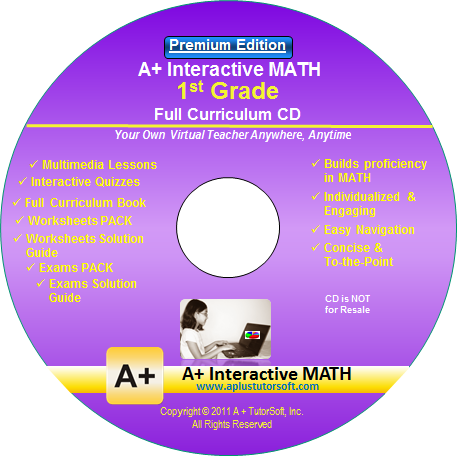
It is no secret that I do not love math. Therefore, it makes sense that I do not love teaching math to my children. That is why I was so excited to be able to get this review! We had the privilege to review a math curriculum from A+TutorSoft, Inc.  A+ TutorSoft offers lessons for grades 1st to 6th grade, as well as pre- algebra and algebra using either an online subscription or a full curriculum CD. For our review, we used the A+ Interactive MATH  CD for 1st grade. It is easy to install, and once loaded does not require you to put the disk in each time. Using step by step lessons, review practices, quizzes and tests, this curriculum covers a lot of ground in an orderly way. First grade concepts covered by chapters are Counting Numbers, Number Sense, Comparing and ordering, Addition, Subtraction, Fractions, Graphs, Time, Money, Measurements, Geometry and Algebra. Included are the lessons, quizzes and tests as well as their answers, additional worksheets, recommended lesson plans and a workbook.


A glance at our day-
We used this curriculum for CJ's math five days a week. He had recently finished his Kindergarten curriculum, so I figured this would be a pretty seamless transition. Luckily, I was right! Like many five year olds, my son likes the computer so he was quite excited to get to do his math on the computer. Each day we selected the next lesson from the menu and learned a new concept. After each lesson he would have the opportunity to practice. One of the things we loved was though you can print off worksheets for each corresponding lesson, you can also choose to just do the review on the computer. If you answer a problem correctly, you get a hearty "well done". If you enter the incorrect answer you will get a step by step explanation of the problem. Because at this level there are only about 7-12 problems per review, the time spent doing the problems was quite manageable for a younger aged child. The tests at the end of each unit are a little more lengthy, but not too overwhelming.

What we liked-
This is a pretty straight forward math program; no flashy games, graphics or rewards, though certificates are available to print out. That being said, A+ TutorSoft is colorful and engaging which we really enjoyed. I loved that even after completing the activities on the computer, we could print out the worksheets for further review if needed, as well as tests. The built in review is flooded with lots of positive reinforcement and an occasional animation that kept CJ engaged. The sidebar menu is well laid out and easy to navigate so we were able to jump around lessons a tad to explore new concepts. One of the new concepts we learned about was the greater than and less than sign. CJ had never been introduced to that and I was worried he might not be old enough to grasp the concept. A+ TutorSoft used the visual of an alligator, named Al E. Gator, who eats the biggest number and he got it right away. His comment after the lesson- "I am King of the numbers!" haha Because this curriculum uses auditory, visual and kinetic learning, it is able to appeal to a variety of kids' learning styles.

What did not work for us-
We found out early on that when a question is asked by the teacher, she answers very quickly, often not giving the child adequate time to answer for themselves. For that reason, I stayed with CJ as he went through each lesson, stopping the CD after the questions so he would have time to answer. I found if I did not, my son soon got wise and just waited for the answer to be given to him. It would be nice if they would lengthen that pause a little. I also would have loved if once you answered each question it could be "entered" in by hitting the enter key on the keyboard, rather than having to use the mouse to click on the "next" button. This did slow our process down and frustrate CJ at times.

Our bottom line-
I like this program. There were a few times I felt like the concepts were a little over the head of my son, but since he is technically just at the end of his Kindergarten year it may be that in a few months he would not struggle with some of those areas. It is a rather pricey curriculum, but let's face it, there are not many quality math programs out there that are cheap. You get what you pay for, and in this case, I do think you are getting a quality curriculum!

The details-
The CD Software sells for $99.99. The premium edition sells for $124.99, and allows you to track up to 5 students manually.

Online Homeschool edition sells for $19.95 per month, $49.99 per quarter, or $124.99 per year. The subscription covers one parent and one student. The online version automatically tacks the student's progress for you.

From now until the end of March A+ TutorSoft is offering a generous 50% off to my readers. Please use the coupon code below when ordering.
Photobucket
 
 photo DisclaimerGraphic1_zpsf612f371.gif