Showing posts with label 2nd grade. Show all posts

Monday, September 15, 2014

Alpha Omega and 2nd Grade Math

I have to be honest with you from the start- I have used the same math for 16 years with my children.  It was only a few years ago that I added in a second math for the older kids.  It was hard.  But as I eyed our current 2nd grade math choice for this school year all I could think about was UGH.  Then I flipped through the table of contents and sighed a second ugh.  Patterns he knows.  Simple math facts he knows.  Teddy bear counters I am tired of.

And then the opportunity to choose and review any program for Alpha Omega Homeschool Publications came and I did a happy dance.  I love God's timing and wisdom!

Alpha Omega Publications (AOP) is a Christian, curriculum company that has been around for a while and is known for their strong curriculum choices.  Actually, I had the privilege of using two of their electives several years ago with much success.  Alpha Omega offers a full line of curriculum for grades Pre-K through 12th grade in four distinct formats.  Their well known Switched-On Schoolhouse is a computer based curriculum offered for grades 3-12.   If you have a visual learner or an auditory learner who loves the computer you should check this out.  Lifepacs are a series of booklet type workbooks that are self directed in their teaching approach.  Monarch is an online based, automatically graded curriculum offering 5 core subjects and over 35 electives.  It is offered for grades 3-12.

Horizons is a brightly illustrated, teacher directed program for ages Pre-K through 12th grade.  Because of my need to expand our own horizons last minute in math, I choose to review Horizons 2nd grade math.

Included in the second grade math set are two student workbooks and a pretty intensive teacher's manual.     The teacher's manual has a 29 page introduction that I highly recommend you read.  It includes the whos, whats and hows of the program.  It then has a two page lesson plan or summary of how to teach for each corresponding lesson in the student activity book.  It also contains the answer keys for each worksheet as well as additional student worksheets to copy and use.


Because I have been doing the same math FOREVER, it has been a long time since I actually read a teacher manual for math, so this one overwhelmed me at first.  Luckily, that did not last long.  Each day is well organized and written out.  Objectives and teaching tips are listed as well as what worksheets will be used and any additional materials, supplies or equipment you may need.  Then each step of teaching for that day is listed with a clear explanation of what to do.  While it is not really scripted, there is an occasion further explanation of how you would word something to better explain it. Once a concept is taught, you are directed to which small section of the workbook your child is to complete.  Once they complete that section you will move on to the next one.
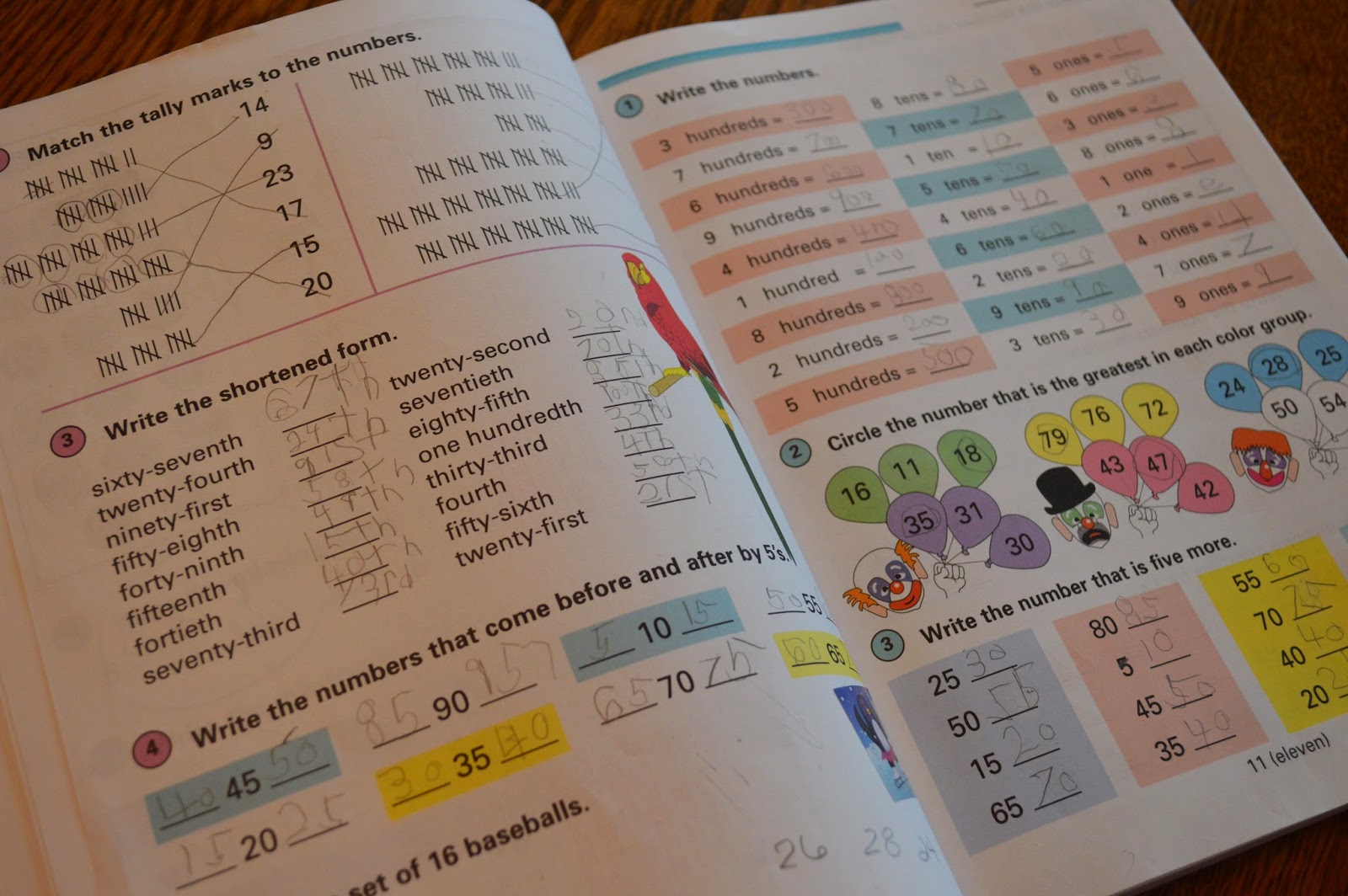

Because Alpha Omega uses the circular teaching approach, once a new concept is taught over a three to five day span.  Then for the next two months it is repeated every two weeks for continual review and practice.  A four week break is then followed again by a three to five day review and then cycle continues.

How did we make this work for us?
Well, I am a rule sort of gal and so while I have heard lots of mommas say they do not always use the teacher's guide, for now I am!  To help me streamline, I read through each day and highlight the main points to be taught and hints on how to teach them for a week at a time.  This just helps me know what we are doing with a quick glance rather than have to stop and figure it out while my son waits.  We then work through the Student Activities one section at a time.  So far for us, each "day" typically lasts us about 30 minutes, give or take.


Likes and dislikes?
Mostly likes, honestly!  Up until now, my son, age 7, has been using one-colored worksheets with very little visual stimulation or interest.  One of the things that drew me to Horizons was the more engaging workbook style.  I realize that might not be everyone elses' bent, but I have found that my guy likes bright and colorful things and he tends to engage more with worksheets.  The other things I have found I really like is how AOP breaks down each student activity into sections.  Rather than just teaching something and then setting him loose with a worksheet on his own, we work together with a give and take.  For a fidgety boy who is easily distracted, this has allowed me to hold his attention more easily.  For students who get tired of writing, this also allows them a break every few minutes while you explain the next section.


The only thing I have found that I do not care for is the current lack of a manipulative set offered by AOP.  In the manual there is a comprehensive list of each thing you will need, from flash cards to counting chips, and which lesson you will need them for, but this busy momma admits to liking having the work done for me. I would love to see them add a basic math manipulative kit to their products!

Bottom line-
We have been very pleased with AOP Horizon Math!  It continues to stretch CJ by teaching new concepts and fits his learning style well.  We look forward to a successful year of math and a ton of learning!


A quick shout out to all of our fellow military homeschoolers.  Alpha Omega graciously offers a 30% discount for military families.  Call their customer support number to ask how to make that happen!


Don't forget you can enter to win your choice of curriculum from Alpha Omega in this incredible giveaway!


Blessings,


Wednesday, August 13, 2014

And What About Curriculum?

So glad you are back!  So far we have talked about myths debunked and organization! It is my prayer that you have been blessed so far by this blog hop and all involved.  There is a wealth of information out there!  Here are a few of my favorites for you to check out-

Marcy @ Ben and Me
Lisa @ Farm Fresh Adventures
Jenn @ Treasuring Life's Blessings
Dusty @ To the Moon and Back
Jacquelin @ A Stable Beginning
Rebekah @ There Will Be a $5 Charge for Whining 
Gena @ I Choose Joy!
Back to Homeschool Blog Hop

I will be the first to tell you that homeschooling is about so much more than curriculum.  So much more.  And that is a post for later in the week.  But let's face it, you NEED curriculum.  Well, most of us do.  I do know that their are "unschoolers" out there that do a good job at using the world around them to teach their children, but I am just not one of those teachers.  I like books and workbooks and notebooks and paper.


After 16 years of this homeschooling journey, I feel like we have used just about everything out there. My oldest, who got to be the guinea pig for most of it, would agree!  While I do not pretend to have all the answers, I love mentoring new homeschoolers on their curriculum choices.  It is one of the reason this blog was born.
There are a lot of good things out there. The problem is you cannot use it all at once.  Eventually you have to choose what you think is best for your child and then forge ahead.

This is a big year for us.  We are making some serious changes in what I have done in the past.  It is scary and exciting all at once. And I reserve the right to change paths at any given moment. ;)

We will talk about high school tomorrow but for now, here is what we are using for my 2nd and 7th grader.

2nd Grade


Reading- Alternating weeks
                 Sonlight 2nd grade readers
                 Explode the Code
and
                 Lightening Literature
                 A Beka Language Arts Seatwork Text
                 * I KNOW this seems overkill to many, but my son LOVES to read, hence the multitude of books and I BELIEVE in a early intro to language arts.  To break up the possible monotony, we will alternate our weeks.

Spelling- All About Spelling Level 3
                 *I have raved about this program before but I will do it again.  I have used just about every spelling program out there and this is THE one I am convinced you should start with.  After they learn the rules and basics, save yourself some time and frustration and move on to Spelling Power.

Math- Horizons from Alpha and Omega
            *We have always used Saxon in the past, but are thrilled to have been given the chance to review Alpha and Omega's 2nd grade math program.  Look for our review at the end of the year.

History- Veritas Press Old Testament and Ancient Egypt
              *This began as a review product that has captured us completely.  We are currently on lesson 62 and my son asks to do multiple lessons a day.  Despite the price, I would recommend this to everyone.   I do not want to miss a lesson myself as we are learning so much.  Some things are worth the money.  This is one of them.

Science- Nancy Larson Science
               *You can click the link and read why we switched to this science and are enjoying it!

Bible- Bible Study Guide for All Ages
           *Another review item that we continue to reorder because we like it that much.  A perfect way to start our school day.

Spanish- Homeschool Spanish Academy
              *Another review item that we love.  CJ Skypes weekly with Mrs. Rosa in Guatemala, his birth country, and learns from the best!  We also continue to review Flip Flop Spanish other days of the week.

Writing- Write Shop B
              *Can you guess? Yes, another product we found through reviewing for the Schoolhouse Review Crew.  It brings me great joy to say that at least one of my boys likes to write! ;)


7th Grade


Reading- Lightning Literature and Composition 7th grade
                * After years of using Sonlight readers, we are walking away.  I just feel this is a better fit for my son and we are excited to be using it.  You can read my review of the 8th grade program, which we will pick up again next year.

Spelling- Spelling Power

Math- Teaching Textbooks 7
           *In the past we switch from Saxon to TT about 5th grade.  Each year I am more and more impressed with this program.

History- Notgrass- Uncle Sam and You
            *This another big change for us.  Up until last year, we have used Sonlight History.  While it was a good fit for my daughters, not so much for my son.  We used America the Beautiful from Notgrass last year and loved it.  My son is the one who asked if we could continue with this company. I think that speaks volumes for this history buff!

Science- Apologia's General Science
              *This is one I have struggled with as I think Apologia is just hard sometimes.  Good, but hard.  But after seeing the notebook available for this one, I was sold.  It is my favorite of all we have used so far and makes the course seem less intimidating.

Bible-  Apologia's What on Earth Can I Do?
            * We began this as a review, took a break and are now continuing on.  An excellent apologetics series.

Spanish- Spanish for Children- Primer A from Classical Academic Press
            *My second daughter used this years ago and we just feel it is one of the strongest out there for not only speaking but to learn grammar as well.  Since it has DVDs and CDs, it is a good fit for my auditory learner.

Writing- Institute for Excellence in Writing
               *Yes, Andrew Peduwa is one of the BEST writing teachers out there in my opinion.  Considering his popularity, many agree.  When it comes to upper level writing, I don't want anyone to teach my kids but him!

And high school?  Well, let's chat tomorrow about that!
Don't forget about the great giveaway!

Blessings,

Wednesday, July 9, 2014

WriteShop- TOS Crew Review

Do you teach writing in your house?  For us it is a subject that, in the past, I have pushed off until middle school and beyond.  Other subjects took precedence and quite frankly, I just did not enjoy teaching it.


Last year I was introduced to 
WriteShop and all of that changed.  Actually, I had the privilege to review WriteShop Junior Level D for my older son and liked it so much, I went back and bought Level A for my then 6 year-old.  We used it last year and loved it. 

For the past few months I have been reviewing  WriteShop Primary: Book B Set for 1st and 2nd graders, as well as reluctant 3rd graders and guess what?  Love it as well!  The set includes the Teacher's Guide as well as an Activity Set Worksheet Pack.
WriteShop Review

WriteShop is a unit style writing program for grades K-6th grade.  Beginning with Level A and continuing on through Level E, it teaches writing in a fun and non-threatening way.  Using a combination of parent-led writing and moving on to student-led writing, WriteShop engages kids with writing prompts, a fun worksheet per unit, and additional activities and game ideas.

Dividing each unit in to 8 "days," WriteShop provides lesson plans for a 3 day a week, covering one lesson every three weeks, or 4 day a week schedule, covering a lesson every two weeks.  There is a schedule that allows you to complete a lesson in one week, but it is recommended only for very fast paced or motivated 3rd or 4th graders.

Here's how the days break down -

Activity 1- Introduction of the unit theme and the worksheet
Activity 2- Reading of a picture book and pre-writing activities
Activity 3- Brainstorming and organizing ideas
Activity 4- Creating a story using the skills learned
Activity 5- Editing and Revising
Activity 6- Guided writing practice
Activity 7- Publishing your project
Activity 8- Evaluating your child's work and a "want to do more" day which provides additional ideas and projects

Themes for Level B include:

Writing a letter
Standard Spelling
Acrostics
Poems and Nursery Rhymes
Fairy Tales
In the News
Humor
Problem and Solution
Character and Setting
Story Organizers


How we used WriteShop Primary: Book B  We have been using WriteShop Level B for our newly turned 7 year old, who will be beginning 2nd grade in August.  We chose to do four lessons a week, covering a unit every two weeks.  This gives us Fridays off, or just provides a built-in extra few days in case we decide we need more time to write.  That has happened! 

What we think -  As I mentioned earlier, we really do love WriteShop.  I love the friendly approach that makes writing fun.  No extra fluff here! Writing is the goal, and you do a lot of it.  Each day begins with guided writing, where the teacher does most of the writing.  When we start off the week and I am doing the writing for CJ, he is relaxed and able to just concentrate on his work.  By me writing for him, his ideas flow! Sometimes extensively!  He also likes the brainstorming days, again because I am writing for him and he is free to be creative without being bound to what he can spell or how fast he can write.  We ease into him writing his story by the end of the first week and by the end of the second he is doing his stories all on his own.  

One of the other things I really like about WriteShop is that has a scripted example on several days of what should take place.  While our conversations never look quite like theirs, it is often a big help to me just to get us started.  In addition, within the teacher's guide there is information on creating a writing center and an extensive section on teaching the lessons.  If this is your first time teaching WriteShop, this is a MUST READ section.  It has many helpful hints that you will need to know.  Also tucked into the pages of the teacher's guide are "parents say..." sections - little quotes and ideas from other parents who have used the program and variations they have used with success.  If any advanced preparation is required on your part, that information is in a highlighted box at the beginning of each lesson.

Two of the things that CJ likes best is the worksheets, which says a lot, and the creative ideas.  Making word families on flowers is more fun that just making a list!  Another technique we have used a lot is making a word bank before he writes.


front of worksheets

back of worksheets


Writing his Acrostic on a pillowcase was just more fun!  He looks forward to project days the most.


When we used the program last year he enjoyed the publishing part of the week the best.  This year I have found that that is not as big of a deal, but if you have a kid that loves to share their work with other family members, ideas like making a holiday party favor with your child's poem or making a basket of "story loaves" will be sure to bring them joy.

Overall, I have no hesitancy in highly recommending WriteShop for your beginner writers.  It is a good, solid writing program that I think will give your student a head start with writing.  We will continue to use it through each level!


Prices- 
WriteShop Primary: Book B Set-$35.95

You can find WriteShop here-
Facebook: https://www.facebook.com/writeshop 
Twitter: https://www.twitter.com/writeshop
Pinterest: http://www.pinterest.com/writeshop/boards/
Instagram: http://instagram.com/kimkautzer 
Google+: https://plus.google.com/+Writeshop/ 

Click to read Crew Reviews
Crew Disclaimer

Friday, February 28, 2014

Science4Us- TOS Crew Review

Featured Review

If you have been following us for long, you know already that teaching science is hard for me.  It is not that I do not like science, it is just that I struggle with teaching it.  I am always on the lookout for anything out there that can help make science more fun for me.  I mean, for my kids.


That is why I was excited to be able to review Science4Us.com, an online science program for kids grades K-2nd.   I have a boy that likes science.  I have a boy who likes the computer.  Perfect fit I hoped!

Guess what?  I was right!  Yay me!  Yay Science4Us!  Let me tell you about it.

Science4Us Online subscription is an interactive online science program for kids Kindergarten through 2nd grade that costs $7.95 per child per month.  When you log in you have a choice of four Books of Science to study- Physical Science, Inquiry, Life Science and Earth and Space.  Within each of those books are numerous modules (28 total) and then within each module are lessons.  Yes, it is enough to keep you busy for quite a while.  Once you choose where you would like to start, there are about 11-12 activities for each module.  Five areas covered in every lesson are engage, explore, explain, elaborate and evaluate.  Additional lessons cover multiple skills with activities like note booking, alphabetizing and playing games, but are slightly different in each module so that your child will not get bored.  The lessons last from just a few minutes to about 20, with the explaining lesson usually being the longest.  Within that lesson is a part called Show What You Know that asks questions to the child about what is being learned.  Some of those questions are open ended discussion questions for you to have with your child to see what they are retaining while others include choosing the correct answer.  If your child chooses incorrectly, that lesson will be replayed for them and they will have the chance to choose the right answer again.  Another example of an activity is one called Silly Bulls.  In it you put the vocabulary being learned into the right spelling order- broken down into syllables.  Get it?  Silly Bulls- Syllables?!  My son thought it was hysterical and often did this activity multiple times so he could see the bulls dance.  Each time the child comes back to their page their recent activity is checked off so they know where to start next.

Science4Us Review
Under the area labeled My Tools, your child can access a glossary of words used for review or if they need a refresher on a word meaning.  There is also a button called mini explain that has 1-2 minute videos that will further explain a term or phrase they might run into and are unfamiliar with.

And then there is the Teacher's account.  Once you log into this area you will find even more.  Lesson plans are available for each module along with corresponding worksheets that you can print out for your child.   There are different lesson pages available to print for Kindergarten, 1st graders and 2nd graders. Objectives are shown as well as an estimated time for that particular lesson.  Your child can take the evaluating tests on their screen, or you can print out a slightly different version from this area as well.  You can also access your child's progress reports and actually assign specific activities for your child to see when they log into their page.  Been a while since you did science?  There are professional development videos for each module for a quick refresher.  From this teacher's page, you can also access your child's notebook to check their activities and even make your own notes on those pages.  

Science4Us Review
Which brings me back to the notebook feature on your child's page.  Each child has a notebook in which they can take notes, draw pictures or do assigned worksheets.  This is by far our favorite part of the site.  Just about anything your child could do on their own notebook paper, they can do here, including change colors, size of font, label, draw free hand or use shapes.  You can even embed a Venn or bar graph!  In addition to that, once they are done and have saved their work they can print it out, or as I mentioned you can see it from your teacher's screen page.


So how did we use Science4Us?  Well, originally I had planned to use this as a supplemental science program.  That lasted about a week when we were accessing the student's page only and allowing my 6 year old to work at his own pace.  Once I had time to explore the teacher's page and find the lesson plans and worksheets, we put aside our current science curriculum and used Science4Us exclusively. Which, by the way, is what we will continue to do through the end of this program.  I did assign CJ portions for a while which I think is a really neat feature, but eventually I stopped doing so and allowed him to work at his own pace.  Usually he wanted to do many more lessons than I had scheduled so I stared printing out the whole modules' worth of lessons and activity pages and then kept them by our computer ready for whatever lessons we covered.  I think for someone teaching multiple children the scheduling function would be of great help, but since it is just the two of us, we were much more flexible to how long we could do science.

Because we were studying animals when this review started, CJ chose to start with the Life book.  The two units were Living Things, which covered Plants, Animals and Living and Nonliving things, and then Balance in Nature which covered Food Webs, Habitats and Eco Awareness.  So far our favorite has been the section on habitats.  He has sorted pictures into habitats, made pictures of his favorite habitats and matched habitats to their descriptions.


So what did we think?  For a family who tends to push science off, I can tell you that we used this program consistently at least four days a week.  This has actually been one of the hardest reviews I have written because there is just so much to the program that I would like to tell you about.  What I saw when we just signed in and let CJ do his own thing pleased me.  What I discovered after exploring the teachers site and attending a webinar on the program thrilled me. (I highly recommend you spend the time to do both!)  If you are looking for a web based science program for your younger elementary kids that they can do independently, you have found the right place.  For those who are in need of a little more help, you can hover over areas and it will be read to you.  If you are looking for a more detailed approach with lessons plans to guide you, you have found the right place as well.  You can pick what you need!  While I know this program is listed for kindergarten to 2nd grade, I am going to tell you that I think that most 3rd graders would benefit from it as well.  This program is not dumbed down!  Words like eco awareness are used, activities requiring alphabetizing are used and big concepts are taught.   There is no doubt that after a year of Science4Us your child will have a strong science start.  I am thrilled to have a program that takes the pain out of teaching science and puts the fun and learning back in.

You can find Science4Us here-
Twitter: https://twitter.com/Science4UsSays
Pinterest: http://www.pinterest.com/science4us/
Facebook: https://www.facebook.com/Science4Us
G+: https://plus.google.com/u/0/b/112259351657747584252/

There are also some interactive demos online that you can try out to see what you think and an iPad app coming soon.

Click to read Crew Reviews

Wednesday, February 26, 2014

KinderBach -TOS Crew Review

Kinderbach Review
We love the sound of music in our house.  Do you?  That's why we were so excited to be asked to review Kerri Gregors' KinderBach .  We had the opportunity to review the iPad app of KinderBach last year and loved it, so I jumped at the chance to review the Online One year Membership with Teacher's Corner.


Kinderbach ReviewIntended to teach piano to children ages 3-7, KinderBach has 6 levels of piano instruction, each containing 10 weeks of lessons.  Each week contains four videos, lasting several minutes a piece.  The site is so easy to navigate.  Each weeks' screen has colorful buttons for the four videos to choose from.  Once you choose which video to watch it will also show you the goal of that day's lesson so you will know what you are going to be working on.  For example- "separating and numbering the finger digits."  It also has a reminder button and link of the corresponding coloring or activity page you will need to print from the book if you have not already done so, as well as any additional supplies you may need like glue an scissors.  A workbook file is included at each level for you to print.


Kinderbach Review
The Teacher's Corner is a special section for you the adult!  It has digital downloads to help you teach your child or even a group of children.  Lessons plans show each week broken into two days worth of activities.  From playing games, to using rhythm instruments to actual piano work, Kerri tells you exactly what you need to teach your child.  A teacher's aid book contains all of the games and activities you will need to print out and use.  The teacher's guide is geared towards a teacher of a group, but talks about goals and theories used.  There are also audio MP3 files, the student book and even certificates.

Kinderbach Review


How we used this program.? I have to admit that we did not use this program twice a week.  Nope!  We were on it much more often!  CJ loves music and he loves Ms. Kerri, so it was an almost daily activity with us.  To make sure we did not go through the level too fast we did repeat many of the videos.  Since we had reviewed this program's iPad version last year, we started a few weeks in.  I initially thought we would be able to begin with level two, but he had forgotten some things so we went back for a while and reviewed earlier lessons.  That is one of the great things about this program, you can bounce back and forth between levels and weeks according to your needs.  If your child needs additional practice on one lesson, you can re-watch that video as often as you need. While the lesson plans are broken down to 4 days a week, one of the glories of this program is that you can adjust it to your child's needs or desires.  We would often watch all four videos for the week on a Monday and then repeat the ones he enjoyed most for the next few days or focus on the ones he needed more work on.  I printed out the entire workbook for the level we were doing at the time, but loved the visual reminder on each day's lesson of what page would be used.   


What did we think?  We love this program!  It is easy to use and so kid friendly.  Kerri has a great personality that I think just naturally draws kids to her.  CJ thinks she is so much fun.  She often asks the child a question and then waits to give them time to respond before moving on.  She is also full of praise and encouragement.  I also like that this program appeals to many learning styles. The videos are done well and have lots of color and animation to capture a child's attention and the catchy music and voices are great for those who have auditory learners.  We did find the volume level tended to be more variable than we would have liked, but all in all it was not a huge problem.  If you have a child who loves arts and crafts there are games to cut out and plenty of pictures to color and worksheets to do.  One of the things that worked to our advantage was that we would pull up this program on the laptop and then take that laptop to the piano while we worked.  Kerri often asks the child to play a song with her so if your computer is not near your piano or laptop, you will have problems with that part.  If you are looking for a complicated way to teach, you will not find it here. Using cute characters like Dodi the donkey and his friend Frisco, Kerri helps kids associate certain parts of the keyboard or music scale with pictures, making them easier to remember.  Dodi's "house" is represented by two black keys as seen below and a train station is a set of three back keys together. By combining these fun visual clues with her instruction, Kerri makes learning the piano fun.


Because my older girls already play the piano well, this has been not only a fun program for my 6 year old, but also a huge confidence builder.  As you can see from the pictures below, he was so excited to be able to "teach" his sister his new song.  From my experience, the younger you can start a child on the piano and with music skills, the better.  To be able to do so in a non threatening, fun format is the best.  KinderBach is sure to deliver that and so much more.  We highly recommend it for a beginning piano instruction program!


KinderBach is currently running a special price of $95.88 for its one year online membership.  That breaks down to about $7.99 per month.  If you have priced piano lessons lately then you will know what a deal this is.  A free online trial is available and will give you a good idea of what you can expect from this program.  I encourage you to check out it with with your child and see what they think.

Facebook:  www.facebook.com/kinderbach
Facebook for Teachers:  www.facebook.com/classroomkinderbach
Twitter: @KinderBach
Pinterest: https://pinterest.com/KinderBach/

Click to read Crew Reviews

Monday, April 8, 2013

TOS CREW Review- ABeCeDarian

 photo abecedarianlogo_zps0ce11eae.jpg
We love to read at our house!  Have I mentioned that before?  And I currently have a 5 year old that is learning how to read.  Therefore, anytime I am offered a chance to review a reading program I am giddy!
ABeCeDarian, developed by Michael Bend, PhD., is a company committed to teach reading using simple decoding strategies.  They were gracious enough to send us all of the following to review:
 
 photo studentworkbookA1_zps65d68892.jpg  
Set of 10 Storybooks- $21.50
Student Workbook A-1 $12.25
Teachers Manuel A-1 $28.50
Student Workbook A-2- $12.25
Teachers Manuel A-2- $28.50
Student Workbook B-1- $10.25
Teachers Manuel B-1- $25.50
ABeCeDarian  Aesop- $2.50
 
Level A is intended for grades Kindergarten through mid-first grade level and level B is intended for mid-first grade though 2nd grade. More levels are available on the website up to 6th grade.
 photo teachersmanualA-1_zps89a4a53d.jpg
Per their web site, ABeCeDarian achieves efficiency in the following ways:
  • It focuses only on essential skills and knowledge
  • It provides the right kind and right amount of practice
  • It provides precise and productive error correction


 Yes, that is a lot of materials!  And a little overwhelming at first.  But not for long.  Each teacher's guide has a well written overview of the program from the philosophy behind the program to the how to's.  Open the book and you are ready to begin.  Each lesson is clearly labeled and includes a word for word script to use in your teaching.   I found once I was familiar with each activity I did not have to use the exact wording they provided, but as with any new to me program, I love the initial guidance.  Each student workbook is broken into corresponding lessons with numerous activities. Each lesson begins with word puzzles in which your child unscrambles letters to make a word that you give them.  Each lesson adds new words, which are then used in the activities that follow.  There are also sounds and words to read and copy, sentences to read and copy,  letters to write and word chains and reading chains.  After several lessons you are then directed to let your child read a corresponding storybook that uses all of the words your child has learned thus far.  
How we used this program-
 photo storybooks_zpsd70a2e5a.jpg Since we had just finished another reading program, this review came at the perfect time.  I had all intentions of starting with level B since CJ knows his letter sounds, how to write the letters and how to read basic words, but after looking through the workbooks, I decided to start at the beginning to give us ample time to learn the program.  Such things like tap and say the sounds, saying a word slowly- "turtle talk", and then saying the word at regular speed- "people talk", were new ideas and I didn't want to by-pass anything.  That being said, we were able to do several of the 27 lessons a day in Level A-1 and are already half way through the A-2 level because of that.  If you have no problems starting in the middle, I would encourage you to take the placement assessment tests on the website to determine where to start.  
 
Our thoughts- 
We have really enjoyed this program.  CJ enjoys workbook pages as long as they are not too long, and we found that this program had just the right balance of written work and reading.  No busy work which I think you find often in many reading programs.  The storybooks are quite simplistic in presentation but ones we enjoyed.  My son loved that after one time reading them with me he could sit and read them by himself.  I think that helped build his confidence.  One of the things I noted with this program is that it really helped him learn to quickly sound out words that he could not remember immediately.   He is a sight reader by heart and before would hesitate to stop and sound out an unfamiliar word. 
 
CJ's favorite activity by far was the error game in which I would read a word on the page, sometimes correctly and sometimes incorrectly and see if he could catch me reading one wrong. It was a game he asked to play over and over again, even if it was not in the lesson for that day.  The other thing he loved were the spelling tests!  Yes, you read that right.  The silly boy thought those were fun!  The first one he took he got a 100% on and ran off quickly to tell his 11 year old brother that he did not get any words wrong and would give him spelling lessons later. 

My favorite activities were the spelling chains in which the student changes one letter of a word to make the new word you say.  For example map-tap-top-cop.  By doing this little exercise he learned to slow down and really look at the word he was reading.  His reading improved drastically and therefore wanted to read more.  Oh how excited he was when he could read to his grandparents this weekend!


As we are nearing the end of the A-2 level, I am excited to start on the B-1 level with CJ!  After that we intend to purchase the next levels and continue with this program.  It is just that good and for the affordable price, I do not think you will be disappointed.  If you are interested in seeing more ABeCeDarian examples, you can download samples from their website.  Click on the banner below to see what other CREW had to say about this program. 
 
Photobucket
 
 photo DisclaimerGraphic1_zpsf612f371.gif