

We love the sound of music in our house. Do you? That's why we were so excited to be asked to review Kerri Gregors' KinderBach . We had the opportunity to review the iPad app of KinderBach last year and loved it, so I jumped at the chance to review the Online One year Membership with Teacher's Corner.
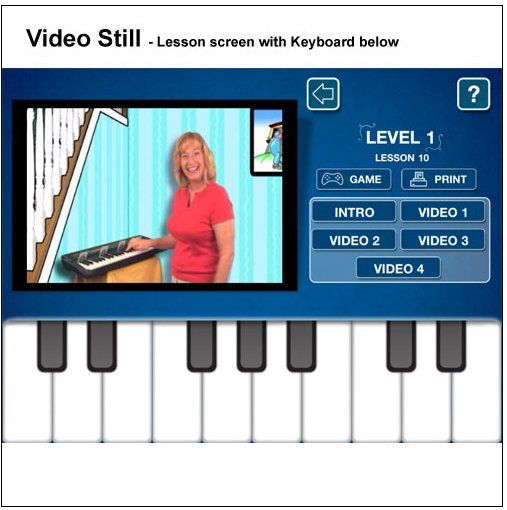
 Intended to teach piano to children ages 3-7, KinderBach has 6 levels of piano instruction, each containing 10 weeks of lessons. Each week contains four videos, lasting several minutes a piece. The site is so easy to navigate. Each weeks' screen has colorful buttons for the four videos to choose from. Once you choose which video to watch it will also show you the goal of that day's lesson so you will know what you are going to be working on. For example- "separating and numbering the finger digits." It also has a reminder button and link of the corresponding coloring or activity page you will need to print from the book if you have not already done so, as well as any additional supplies you may need like glue an scissors. A workbook file is included at each level for you to print.
The Teacher's Corner is a special section for you the adult! It has digital downloads to help you teach your child or even a group of children. Lessons plans show each week broken into two days worth of activities. From playing games, to using rhythm instruments to actual piano work, Kerri tells you exactly what you need to teach your child. A teacher's aid book contains all of the games and activities you will need to print out and use. The teacher's guide is geared towards a teacher of a group, but talks about goals and theories used. There are also audio MP3 files, the student book and even certificates.

How we used this program.? I have to admit that we did not use this program twice a week. Nope! We were on it much more often! CJ loves music and he loves Ms. Kerri, so it was an almost daily activity with us. To make sure we did not go through the level too fast we did repeat many of the videos. Since we had reviewed this program's iPad version last year, we started a few weeks in. I initially thought we would be able to begin with level two, but he had forgotten some things so we went back for a while and reviewed earlier lessons. That is one of the great things about this program, you can bounce back and forth between levels and weeks according to your needs. If your child needs additional practice on one lesson, you can re-watch that video as often as you need. While the lesson plans are broken down to 4 days a week, one of the glories of this program is that you can adjust it to your child's needs or desires. We would often watch all four videos for the week on a Monday and then repeat the ones he enjoyed most for the next few days or focus on the ones he needed more work on. I printed out the entire workbook for the level we were doing at the time, but loved the visual reminder on each day's lesson of what page would be used.
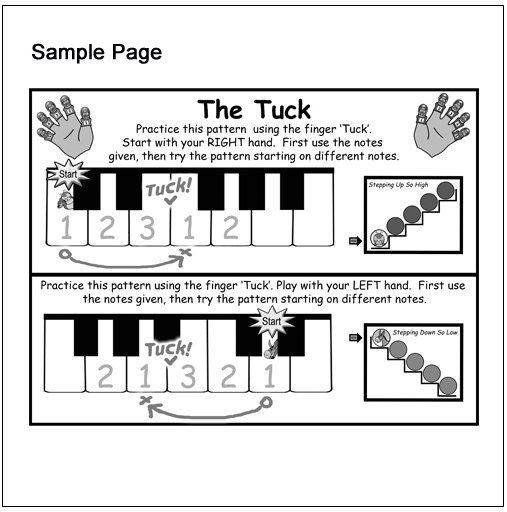
What did we think? We love this program! It is easy to use and so kid friendly. Kerri has a great personality that I think just naturally draws kids to her. CJ thinks she is so much fun. She often asks the child a question and then waits to give them time to respond before moving on. She is also full of praise and encouragement. I also like that this program appeals to many learning styles. The videos are done well and have lots of color and animation to capture a child's attention and the catchy music and voices are great for those who have auditory learners. We did find the volume level tended to be more variable than we would have liked, but all in all it was not a huge problem. If you have a child who loves arts and crafts there are games to cut out and plenty of pictures to color and worksheets to do. One of the things that worked to our advantage was that we would pull up this program on the laptop and then take that laptop to the piano while we worked. Kerri often asks the child to play a song with her so if your computer is not near your piano or laptop, you will have problems with that part. If you are looking for a complicated way to teach, you will not find it here. Using cute characters like Dodi the donkey and his friend Frisco, Kerri helps kids associate certain parts of the keyboard or music scale with pictures, making them easier to remember. Dodi's "house" is represented by two black keys as seen below and a train station is a set of three back keys together. By combining these fun visual clues with her instruction, Kerri makes learning the piano fun.

Because my older girls already play the piano well, this has been not only a fun program for my 6 year old, but also a huge confidence builder. As you can see from the pictures below, he was so excited to be able to "teach" his sister his new song. From my experience, the younger you can start a child on the piano and with music skills, the better. To be able to do so in a non threatening, fun format is the best. KinderBach is sure to deliver that and so much more. We highly recommend it for a beginning piano instruction program!

KinderBach is currently running a special price of $95.88 for its one year online membership. That breaks down to about $7.99 per month. If you have priced piano lessons lately then you will know what a deal this is. A free online trial is available and will give you a good idea of what you can expect from this program. I encourage you to check out it with with your child and see what they think.
Facebook for Teachers: www.facebook.com/classroomkinderbach
Twitter: @KinderBach
Pinterest: https://pinterest.com/KinderBach/
YouTube: KinderBach Preschool Piano

.jpg)




 Welcome! Follow our family of 6 on our military moving, God loving, homeschool adventure! We are honored you have joined us and look forward to hearing from you.


