Showing posts with label 1st grade. Show all posts

Friday, February 28, 2014

Science4Us- TOS Crew Review

Featured Review

If you have been following us for long, you know already that teaching science is hard for me.  It is not that I do not like science, it is just that I struggle with teaching it.  I am always on the lookout for anything out there that can help make science more fun for me.  I mean, for my kids.


That is why I was excited to be able to review Science4Us.com, an online science program for kids grades K-2nd.   I have a boy that likes science.  I have a boy who likes the computer.  Perfect fit I hoped!

Guess what?  I was right!  Yay me!  Yay Science4Us!  Let me tell you about it.

Science4Us Online subscription is an interactive online science program for kids Kindergarten through 2nd grade that costs $7.95 per child per month.  When you log in you have a choice of four Books of Science to study- Physical Science, Inquiry, Life Science and Earth and Space.  Within each of those books are numerous modules (28 total) and then within each module are lessons.  Yes, it is enough to keep you busy for quite a while.  Once you choose where you would like to start, there are about 11-12 activities for each module.  Five areas covered in every lesson are engage, explore, explain, elaborate and evaluate.  Additional lessons cover multiple skills with activities like note booking, alphabetizing and playing games, but are slightly different in each module so that your child will not get bored.  The lessons last from just a few minutes to about 20, with the explaining lesson usually being the longest.  Within that lesson is a part called Show What You Know that asks questions to the child about what is being learned.  Some of those questions are open ended discussion questions for you to have with your child to see what they are retaining while others include choosing the correct answer.  If your child chooses incorrectly, that lesson will be replayed for them and they will have the chance to choose the right answer again.  Another example of an activity is one called Silly Bulls.  In it you put the vocabulary being learned into the right spelling order- broken down into syllables.  Get it?  Silly Bulls- Syllables?!  My son thought it was hysterical and often did this activity multiple times so he could see the bulls dance.  Each time the child comes back to their page their recent activity is checked off so they know where to start next.

Science4Us Review
Under the area labeled My Tools, your child can access a glossary of words used for review or if they need a refresher on a word meaning.  There is also a button called mini explain that has 1-2 minute videos that will further explain a term or phrase they might run into and are unfamiliar with.

And then there is the Teacher's account.  Once you log into this area you will find even more.  Lesson plans are available for each module along with corresponding worksheets that you can print out for your child.   There are different lesson pages available to print for Kindergarten, 1st graders and 2nd graders. Objectives are shown as well as an estimated time for that particular lesson.  Your child can take the evaluating tests on their screen, or you can print out a slightly different version from this area as well.  You can also access your child's progress reports and actually assign specific activities for your child to see when they log into their page.  Been a while since you did science?  There are professional development videos for each module for a quick refresher.  From this teacher's page, you can also access your child's notebook to check their activities and even make your own notes on those pages.  

Science4Us Review
Which brings me back to the notebook feature on your child's page.  Each child has a notebook in which they can take notes, draw pictures or do assigned worksheets.  This is by far our favorite part of the site.  Just about anything your child could do on their own notebook paper, they can do here, including change colors, size of font, label, draw free hand or use shapes.  You can even embed a Venn or bar graph!  In addition to that, once they are done and have saved their work they can print it out, or as I mentioned you can see it from your teacher's screen page.


So how did we use Science4Us?  Well, originally I had planned to use this as a supplemental science program.  That lasted about a week when we were accessing the student's page only and allowing my 6 year old to work at his own pace.  Once I had time to explore the teacher's page and find the lesson plans and worksheets, we put aside our current science curriculum and used Science4Us exclusively. Which, by the way, is what we will continue to do through the end of this program.  I did assign CJ portions for a while which I think is a really neat feature, but eventually I stopped doing so and allowed him to work at his own pace.  Usually he wanted to do many more lessons than I had scheduled so I stared printing out the whole modules' worth of lessons and activity pages and then kept them by our computer ready for whatever lessons we covered.  I think for someone teaching multiple children the scheduling function would be of great help, but since it is just the two of us, we were much more flexible to how long we could do science.

Because we were studying animals when this review started, CJ chose to start with the Life book.  The two units were Living Things, which covered Plants, Animals and Living and Nonliving things, and then Balance in Nature which covered Food Webs, Habitats and Eco Awareness.  So far our favorite has been the section on habitats.  He has sorted pictures into habitats, made pictures of his favorite habitats and matched habitats to their descriptions.


So what did we think?  For a family who tends to push science off, I can tell you that we used this program consistently at least four days a week.  This has actually been one of the hardest reviews I have written because there is just so much to the program that I would like to tell you about.  What I saw when we just signed in and let CJ do his own thing pleased me.  What I discovered after exploring the teachers site and attending a webinar on the program thrilled me. (I highly recommend you spend the time to do both!)  If you are looking for a web based science program for your younger elementary kids that they can do independently, you have found the right place.  For those who are in need of a little more help, you can hover over areas and it will be read to you.  If you are looking for a more detailed approach with lessons plans to guide you, you have found the right place as well.  You can pick what you need!  While I know this program is listed for kindergarten to 2nd grade, I am going to tell you that I think that most 3rd graders would benefit from it as well.  This program is not dumbed down!  Words like eco awareness are used, activities requiring alphabetizing are used and big concepts are taught.   There is no doubt that after a year of Science4Us your child will have a strong science start.  I am thrilled to have a program that takes the pain out of teaching science and puts the fun and learning back in.

You can find Science4Us here-
Twitter: https://twitter.com/Science4UsSays
Pinterest: http://www.pinterest.com/science4us/
Facebook: https://www.facebook.com/Science4Us
G+: https://plus.google.com/u/0/b/112259351657747584252/

There are also some interactive demos online that you can try out to see what you think and an iPad app coming soon.

Click to read Crew Reviews

Wednesday, February 26, 2014

KinderBach -TOS Crew Review

Kinderbach Review
We love the sound of music in our house.  Do you?  That's why we were so excited to be asked to review Kerri Gregors' KinderBach .  We had the opportunity to review the iPad app of KinderBach last year and loved it, so I jumped at the chance to review the Online One year Membership with Teacher's Corner.


Kinderbach ReviewIntended to teach piano to children ages 3-7, KinderBach has 6 levels of piano instruction, each containing 10 weeks of lessons.  Each week contains four videos, lasting several minutes a piece.  The site is so easy to navigate.  Each weeks' screen has colorful buttons for the four videos to choose from.  Once you choose which video to watch it will also show you the goal of that day's lesson so you will know what you are going to be working on.  For example- "separating and numbering the finger digits."  It also has a reminder button and link of the corresponding coloring or activity page you will need to print from the book if you have not already done so, as well as any additional supplies you may need like glue an scissors.  A workbook file is included at each level for you to print.


Kinderbach Review
The Teacher's Corner is a special section for you the adult!  It has digital downloads to help you teach your child or even a group of children.  Lessons plans show each week broken into two days worth of activities.  From playing games, to using rhythm instruments to actual piano work, Kerri tells you exactly what you need to teach your child.  A teacher's aid book contains all of the games and activities you will need to print out and use.  The teacher's guide is geared towards a teacher of a group, but talks about goals and theories used.  There are also audio MP3 files, the student book and even certificates.

Kinderbach Review


How we used this program.? I have to admit that we did not use this program twice a week.  Nope!  We were on it much more often!  CJ loves music and he loves Ms. Kerri, so it was an almost daily activity with us.  To make sure we did not go through the level too fast we did repeat many of the videos.  Since we had reviewed this program's iPad version last year, we started a few weeks in.  I initially thought we would be able to begin with level two, but he had forgotten some things so we went back for a while and reviewed earlier lessons.  That is one of the great things about this program, you can bounce back and forth between levels and weeks according to your needs.  If your child needs additional practice on one lesson, you can re-watch that video as often as you need. While the lesson plans are broken down to 4 days a week, one of the glories of this program is that you can adjust it to your child's needs or desires.  We would often watch all four videos for the week on a Monday and then repeat the ones he enjoyed most for the next few days or focus on the ones he needed more work on.  I printed out the entire workbook for the level we were doing at the time, but loved the visual reminder on each day's lesson of what page would be used.   


What did we think?  We love this program!  It is easy to use and so kid friendly.  Kerri has a great personality that I think just naturally draws kids to her.  CJ thinks she is so much fun.  She often asks the child a question and then waits to give them time to respond before moving on.  She is also full of praise and encouragement.  I also like that this program appeals to many learning styles. The videos are done well and have lots of color and animation to capture a child's attention and the catchy music and voices are great for those who have auditory learners.  We did find the volume level tended to be more variable than we would have liked, but all in all it was not a huge problem.  If you have a child who loves arts and crafts there are games to cut out and plenty of pictures to color and worksheets to do.  One of the things that worked to our advantage was that we would pull up this program on the laptop and then take that laptop to the piano while we worked.  Kerri often asks the child to play a song with her so if your computer is not near your piano or laptop, you will have problems with that part.  If you are looking for a complicated way to teach, you will not find it here. Using cute characters like Dodi the donkey and his friend Frisco, Kerri helps kids associate certain parts of the keyboard or music scale with pictures, making them easier to remember.  Dodi's "house" is represented by two black keys as seen below and a train station is a set of three back keys together. By combining these fun visual clues with her instruction, Kerri makes learning the piano fun.


Because my older girls already play the piano well, this has been not only a fun program for my 6 year old, but also a huge confidence builder.  As you can see from the pictures below, he was so excited to be able to "teach" his sister his new song.  From my experience, the younger you can start a child on the piano and with music skills, the better.  To be able to do so in a non threatening, fun format is the best.  KinderBach is sure to deliver that and so much more.  We highly recommend it for a beginning piano instruction program!


KinderBach is currently running a special price of $95.88 for its one year online membership.  That breaks down to about $7.99 per month.  If you have priced piano lessons lately then you will know what a deal this is.  A free online trial is available and will give you a good idea of what you can expect from this program.  I encourage you to check out it with with your child and see what they think.

Facebook:  www.facebook.com/kinderbach
Facebook for Teachers:  www.facebook.com/classroomkinderbach
Twitter: @KinderBach
Pinterest: https://pinterest.com/KinderBach/

Click to read Crew Reviews

Wednesday, September 11, 2013

School Choices


We school year round.  Yep, we really do.  It is one of the things I love about homeschooling.  Notice I did not say it is one of the things the kids love! ;)  We usually "start" school in August and "finish" up mid May and then take a week or so off to regroup.  Then we start a lighter schedule which usually consists of math and many review items.  Being on the TOS Review Crew has been a HUGE blessing to us, providing us with unbelievable curriculum, books and extras we would have never had access to otherwise.  A lot of these things we review in the summer months which is perfect timing and allows us to concentrate on them exclusively for a while.  Then, one random day in August I decide to "start" school again in which we add a few more subjects back in.  After that week, I take a week off to regroup and evaluate as well as schedule our full days and then off we go again.  Sounds complicated, but really, it works for us.

So yes, I realize I am a little behind in posting this.  Most of you have already started school and know EXACTLY what you are using this year.  But for those of you who need some ideas or just like peeking into other's school rooms, here is what we are doing this year.

1st Grade


History-Mystery of History 1- We just read together and do some of the activities
Science- Apologia's Exploring Creation with Zoology 3 Land Animals and junior notebook.  If you have never used this science, I encourage you to take a look at it.  The books are beautiful, amazing, and so much fun!
Writing- Write Shop.  This was new to me until I did a review for them last year for my older son.  We started with the first book and are having a good time with it!
Spanish- Those of you who know me know that this is my passion so here goes!- Homeschool Spanish Academy, Flip Flop Spanish Review coming soon!) and Song School Spanish.  YES, we really are using ALL three at once time and loving every one for the things they bring to our day!
Math- Saxon 1.  My kiddo is hands on so the manips are right up his alley.  We do switch to Teaching Textbooks in 5th grade
Language Arts- Another area we are all over the place in so bear with me!  Explode the Code and Logic of English for now.
Reading- ABeCeDarian.  Once we finish the Sonlight readers we will begin the Lightening Literature program.  We also use the Reading Kingdom and McGuffy Reading Apps on a weekly basis!
Spelling- This one we have held off on but I think I am going to start back with All About Spelling next week and see how he does.  I think the hands on will be a good fit.

6th Grade

History- Notgrass America the Beautiful  Yes, we walked away from Sonlight History for this one.  It was a hard decision for me, but my son loves it!
Science- ABEKA Observing God's World.  I am keeping my eye out on the new Apologia Chemistry book that has just been released as well as the new Jay Wiley Creation Science, but for now we will stick with this.
Writing- Cover Story  This is brand new, put out by the people at One Year Adventure Novel.  Next week will be our first week, but at first glance- WOW!
Spanish- Flip Flop Spanish (review coming soon), Power Glide and Spanish For You!
Math- Teaching Textbooks 6th grade
Language Arts- Wordly Wise, Junior Analytical Grammar, and now Logic of English, as well as Soaring with Spelling
Reading- Sonlight Reading
Geography- Finishing up Memoria Press Geography 1 and love it!
Typing- Typer Island
Bible- Apologia's Who am I? And What and I Doing Here?  We reviewed another book in this series and knew we had to read them all!


10th grade/11th grade

Sonlight History, Bible and Literature
Science- Apologia Chemistry
Writing- IEW with our co-op
Math- Algebra Teaching Textbooks
Spanish 3- Rosetta Stone
Language Arts- Wordly Wise and Vocabulary from Classical Roots Home Economics- Family Life Skills for Christian Schools, Manners Made Easy for Teens, Etiquette Factory Level 3
This kiddo is also studying for the Biology and Algebra CLEP tests, as well as taking photography. She is a busy beaver!

Wow.  That makes me tired just typing it all.  You should see how we all look at the end of the day!

Yes, a little tired. Some days, even a little brain fried.
But hopefully in the end, a little smarter as well!

I pray you all have a blessed school year- public, private, OR homeschooled!

Blessings,


*None of the curriculum listed are affiliates.  They are just products are family uses and loves!

Wednesday, June 5, 2013

TOS CREW Review- Math Mammoth

 photo logo_zps1488a12d.jpg
 
I have been using the same two math programs with my kids for the past 15 years.  Seriously!  So I have to tell you I got excited when Math Mammoth allowed us to review their Math Mammoth Grade 1 Complete Curriculum for CJ.  Sometimes you just need something different to jump start your learning.  Guess what?  I was not disappointed.
 photo lighblue_zps2ba8ce5b.jpg Math Mammoth actually offers several different options for learning.  Their Light Blue series, which we reviewed, is a complete curriculum for grades 1-6 .  Other books that they offer vary in ages and skills.   Each Light Blue series grade comes with two downloadable workbooks (over 250 pages of lessons), a worksheet generator, and tests and answer keys and bonus Soft-pack.   The first grade level covers addition and subtraction, whole numbers and placement up to 100, measuring length, geometric shapes, telling time and counting coins.  Living outside the United States?  An amazing bonus is that when you study coins in grades 1-3 there are pages covering Canadian, British, European, and Australian currencies as well.  How cool is that?  Also, instead of a spiral teaching style, Math Mammoth is mastery based, each chapter devoted to a particular concept, giving your child the opportunity to concentrate on the skill being taught.
How it works-
The 1st grade complete curriculum begins with a short Kindergarten review.  It quickly reviews skills like same and different, position words, writing numbers, counting and colors and shapes.  Then the 1st grade chapters begin.  Because these are considered "worktexts" there is not a separate teacher's guide.  Instead,  each chapter starts with an introduction and overview of what that chapter is about, along with helpful teaching hints, game ideas and suggested Internet resources.   The worktext pages are pretty self explanatory, but if there is any teaching that needs to be done, the explanation is right there on the page to be read and taught by you the parent.  Additionsl materials that Math Mammoth suggests you have in advance are a 100 bead abacus, a ruler and an analog clock.
What we did and what we liked-


Because we had just recently finished Kindergarten with CJ, this review came at the perfect time to introduce 1st grade material to him.  I downloaded and printed out the first worktext and then for ease of use, bound it. There is no set recommended amount of pages to be done in each sitting, so we aimed for at least two pages each day.  I did find that occasionally a lesson was rather long and then we broke it up, but CJ has just finished Kindergarten so I think that once he has a few more months on him, this will not be an issue.   One of the things I really enjoyed about this curriculum was the range of activities and types of problems.  While it provides the needed repetition with a skill, it does so in different ways, thus allowing the student not to get bored.  Word problems are included at this level, as are "mental math", two skills that I know from experience are valuable to learn at an early age.  The worktext pages include colorful pictures and engaging problems that held CJ's interest and he seemed to look forward to our daily math time.
 
 
Costs-
For a year's worth of lessons, I am amazed at the cost of this program.  The full 1st grade down loadable program costs $34.00.  You can also buy the workbooks on CD or in printed form.   In addition, you may order the two worktexts for each grade separately if you are beginning in the middle of a year.
 
Don't know where to start?  Have your child take one of the placement tests and go from there!  Whether you need a complete math curriculum or just worksheets based on grade or even topic, I do not think you will be disappointed with Math Mammoth!
 
 
Fellow CREW members had the opportunity to review Math Mammoth's other products and different grade levels.  I encourage you to check out the reviews!
 
Photobucket
 
 photo DisclaimerGraphic1_zpsf612f371.gif

Monday, April 8, 2013

TOS CREW Review- ABeCeDarian

 photo abecedarianlogo_zps0ce11eae.jpg
We love to read at our house!  Have I mentioned that before?  And I currently have a 5 year old that is learning how to read.  Therefore, anytime I am offered a chance to review a reading program I am giddy!
ABeCeDarian, developed by Michael Bend, PhD., is a company committed to teach reading using simple decoding strategies.  They were gracious enough to send us all of the following to review:
 
 photo studentworkbookA1_zps65d68892.jpg  
Set of 10 Storybooks- $21.50
Student Workbook A-1 $12.25
Teachers Manuel A-1 $28.50
Student Workbook A-2- $12.25
Teachers Manuel A-2- $28.50
Student Workbook B-1- $10.25
Teachers Manuel B-1- $25.50
ABeCeDarian  Aesop- $2.50
 
Level A is intended for grades Kindergarten through mid-first grade level and level B is intended for mid-first grade though 2nd grade. More levels are available on the website up to 6th grade.
 photo teachersmanualA-1_zps89a4a53d.jpg
Per their web site, ABeCeDarian achieves efficiency in the following ways:
  • It focuses only on essential skills and knowledge
  • It provides the right kind and right amount of practice
  • It provides precise and productive error correction


 Yes, that is a lot of materials!  And a little overwhelming at first.  But not for long.  Each teacher's guide has a well written overview of the program from the philosophy behind the program to the how to's.  Open the book and you are ready to begin.  Each lesson is clearly labeled and includes a word for word script to use in your teaching.   I found once I was familiar with each activity I did not have to use the exact wording they provided, but as with any new to me program, I love the initial guidance.  Each student workbook is broken into corresponding lessons with numerous activities. Each lesson begins with word puzzles in which your child unscrambles letters to make a word that you give them.  Each lesson adds new words, which are then used in the activities that follow.  There are also sounds and words to read and copy, sentences to read and copy,  letters to write and word chains and reading chains.  After several lessons you are then directed to let your child read a corresponding storybook that uses all of the words your child has learned thus far.  
How we used this program-
 photo storybooks_zpsd70a2e5a.jpg Since we had just finished another reading program, this review came at the perfect time.  I had all intentions of starting with level B since CJ knows his letter sounds, how to write the letters and how to read basic words, but after looking through the workbooks, I decided to start at the beginning to give us ample time to learn the program.  Such things like tap and say the sounds, saying a word slowly- "turtle talk", and then saying the word at regular speed- "people talk", were new ideas and I didn't want to by-pass anything.  That being said, we were able to do several of the 27 lessons a day in Level A-1 and are already half way through the A-2 level because of that.  If you have no problems starting in the middle, I would encourage you to take the placement assessment tests on the website to determine where to start.  
 
Our thoughts- 
We have really enjoyed this program.  CJ enjoys workbook pages as long as they are not too long, and we found that this program had just the right balance of written work and reading.  No busy work which I think you find often in many reading programs.  The storybooks are quite simplistic in presentation but ones we enjoyed.  My son loved that after one time reading them with me he could sit and read them by himself.  I think that helped build his confidence.  One of the things I noted with this program is that it really helped him learn to quickly sound out words that he could not remember immediately.   He is a sight reader by heart and before would hesitate to stop and sound out an unfamiliar word. 
 
CJ's favorite activity by far was the error game in which I would read a word on the page, sometimes correctly and sometimes incorrectly and see if he could catch me reading one wrong. It was a game he asked to play over and over again, even if it was not in the lesson for that day.  The other thing he loved were the spelling tests!  Yes, you read that right.  The silly boy thought those were fun!  The first one he took he got a 100% on and ran off quickly to tell his 11 year old brother that he did not get any words wrong and would give him spelling lessons later. 

My favorite activities were the spelling chains in which the student changes one letter of a word to make the new word you say.  For example map-tap-top-cop.  By doing this little exercise he learned to slow down and really look at the word he was reading.  His reading improved drastically and therefore wanted to read more.  Oh how excited he was when he could read to his grandparents this weekend!


As we are nearing the end of the A-2 level, I am excited to start on the B-1 level with CJ!  After that we intend to purchase the next levels and continue with this program.  It is just that good and for the affordable price, I do not think you will be disappointed.  If you are interested in seeing more ABeCeDarian examples, you can download samples from their website.  Click on the banner below to see what other CREW had to say about this program. 
 
Photobucket
 
 photo DisclaimerGraphic1_zpsf612f371.gif

Wednesday, March 13, 2013

CREW REVIEW- TouchMath


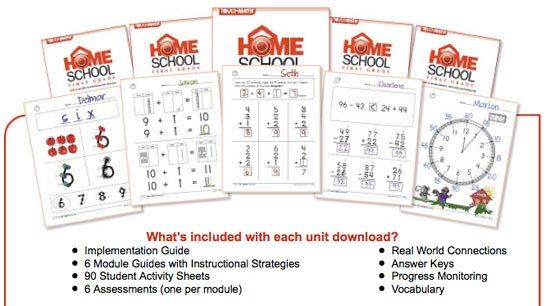
Look what came to our door a few weeks ago!  What child would not be excited to start a new program, even if it is math, when that kind of big box shows up at their door step?!  It was like Christmas around here!  Yes, TouchMath is here and the fun has begun.  Really!  For my hands-on five year old, this program has been perfect.

TouchMath is intended for ages PreK through 2nd grade, but can also be used for older students struggling with lower level concepts or those with learning disabilities.  Because of the multisensory approach, it is perfect for all learning types, teaching the Common Core State Standards for each grade.  By assigning counting points, or "touch points" to each number, children learn that numbers actually represent a quantity of something.

 logo photo touchlogo_zps5760f524.jpg


 Let me start at the beginning and tell you what arrived and then what we have been doing.  We were chosen to review the First Grade program which include four units that were sent straight to our email for us to download.  Easy to do, but let me forewarn you, they are BIG files and took a little patience.  The first unit alone, complete with teacher instructions and children's worksheets was over 190 pages!  After reading several pages on the how-to's and why, you are ready to begin the program.


Then the box arrived.  In it- large foam touch point numbers and unit trays to hold the touch points, CD's for added reinforcement for the lesson, number cards and 12 sets of flip cards.  All of these manipulatives are considered "extras" for the program, but I will tell you ahead of time, we loved having them.  If your child is not a hands-on learner, they are probably not as necessary, but for us, they really completed the program.  I have also read several testimonies of parents of special needs children that said the manipulatives made all the difference in the world for their children.

CJ punching out the foam numbers.

Each day, guided by a scripted teacher's page, I would teach or review a concept and then do the associated workbook pages that we had printed off.  Ideas for using the extra manipulatives are not introduced in earlier lessons, but we did make a habit of putting the "touch points" on the foam numbers each day to get us started.


Once we got to the addition and subtraction parts of the lessons, we used those same foam numbers to work out problems.


What we liked about this product:
*The teacher's guide is scripted.  I know this is often not needed for veteran homeschooling parents, but since many of the TouchMath concepts are taught slightly different than the way I was taught, I really found this to be helpful!
*The software was AMAZING!  Really.  I must say that I originally popped this CD in as an "extra".  It however, became our favorite part of the program and CJ's reward for a day well done.  The host- UNO Bear, is a delightful character that reviews concepts you have been teaching while traveling around the USA, state by state.  Not only did CJ like anticipating which state was going to be next, but he learned a little History and Geography along the way.  If I had to choose one "extra" to buy with this curriculum, this would be the one!
*Keep in mind that each of the units are broken down into modules, each focusing on a new skill set.  When ordering curriculum, you can see see where your child is and then order only that unit if you need to.  CJ could have started with the third unit, however, I did enjoy beginning at Unit One because I wanted to make sure he had a strong foundation in how this program taught things.  Some people have a hard time starting in the middle...I am one of those people!  ;)  We just breezed through the beginning until we got to new material.
 
Math can be taught so many ways, and I know that there are many good products out there.  I encourage you to take a look at this program...it makes learning fun AND it may very well be a good fit for your child!
 
Pricing-
TouchMath First Grade Homeschool -All four Units $199.95, or $59.95 per unit
Flip Cards- $19.00 per set
TouchNumerals with Base 10- $99.00
TouchMath Tutor First Grade Software- $99.00
Additional Manipulatives are also available!


Photobucket
 
Disclaimer: I received a free copy of this product through the Schoolhouse Review Crew in exchange for my honest review. I was not required to write a positive review nor was I compensated in any other way. All opinions I have expressed are my own or those of my family. I am disclosing this in accordance with the FTC Regulations.


Monday, February 25, 2013

CREW Review- A+ TutorSoft


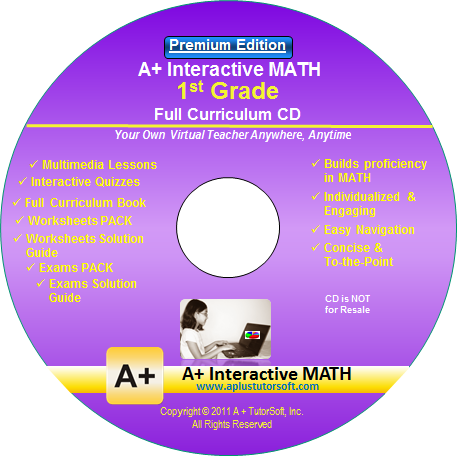
It is no secret that I do not love math. Therefore, it makes sense that I do not love teaching math to my children. That is why I was so excited to be able to get this review! We had the privilege to review a math curriculum from A+TutorSoft, Inc.  A+ TutorSoft offers lessons for grades 1st to 6th grade, as well as pre- algebra and algebra using either an online subscription or a full curriculum CD. For our review, we used the A+ Interactive MATH  CD for 1st grade. It is easy to install, and once loaded does not require you to put the disk in each time. Using step by step lessons, review practices, quizzes and tests, this curriculum covers a lot of ground in an orderly way. First grade concepts covered by chapters are Counting Numbers, Number Sense, Comparing and ordering, Addition, Subtraction, Fractions, Graphs, Time, Money, Measurements, Geometry and Algebra. Included are the lessons, quizzes and tests as well as their answers, additional worksheets, recommended lesson plans and a workbook.


A glance at our day-
We used this curriculum for CJ's math five days a week. He had recently finished his Kindergarten curriculum, so I figured this would be a pretty seamless transition. Luckily, I was right! Like many five year olds, my son likes the computer so he was quite excited to get to do his math on the computer. Each day we selected the next lesson from the menu and learned a new concept. After each lesson he would have the opportunity to practice. One of the things we loved was though you can print off worksheets for each corresponding lesson, you can also choose to just do the review on the computer. If you answer a problem correctly, you get a hearty "well done". If you enter the incorrect answer you will get a step by step explanation of the problem. Because at this level there are only about 7-12 problems per review, the time spent doing the problems was quite manageable for a younger aged child. The tests at the end of each unit are a little more lengthy, but not too overwhelming.

What we liked-
This is a pretty straight forward math program; no flashy games, graphics or rewards, though certificates are available to print out. That being said, A+ TutorSoft is colorful and engaging which we really enjoyed. I loved that even after completing the activities on the computer, we could print out the worksheets for further review if needed, as well as tests. The built in review is flooded with lots of positive reinforcement and an occasional animation that kept CJ engaged. The sidebar menu is well laid out and easy to navigate so we were able to jump around lessons a tad to explore new concepts. One of the new concepts we learned about was the greater than and less than sign. CJ had never been introduced to that and I was worried he might not be old enough to grasp the concept. A+ TutorSoft used the visual of an alligator, named Al E. Gator, who eats the biggest number and he got it right away. His comment after the lesson- "I am King of the numbers!" haha Because this curriculum uses auditory, visual and kinetic learning, it is able to appeal to a variety of kids' learning styles.

What did not work for us-
We found out early on that when a question is asked by the teacher, she answers very quickly, often not giving the child adequate time to answer for themselves. For that reason, I stayed with CJ as he went through each lesson, stopping the CD after the questions so he would have time to answer. I found if I did not, my son soon got wise and just waited for the answer to be given to him. It would be nice if they would lengthen that pause a little. I also would have loved if once you answered each question it could be "entered" in by hitting the enter key on the keyboard, rather than having to use the mouse to click on the "next" button. This did slow our process down and frustrate CJ at times.

Our bottom line-
I like this program. There were a few times I felt like the concepts were a little over the head of my son, but since he is technically just at the end of his Kindergarten year it may be that in a few months he would not struggle with some of those areas. It is a rather pricey curriculum, but let's face it, there are not many quality math programs out there that are cheap. You get what you pay for, and in this case, I do think you are getting a quality curriculum!

The details-
The CD Software sells for $99.99. The premium edition sells for $124.99, and allows you to track up to 5 students manually.

Online Homeschool edition sells for $19.95 per month, $49.99 per quarter, or $124.99 per year. The subscription covers one parent and one student. The online version automatically tacks the student's progress for you.

From now until the end of March A+ TutorSoft is offering a generous 50% off to my readers. Please use the coupon code below when ordering.
Photobucket
 
 photo DisclaimerGraphic1_zpsf612f371.gif